- First, create a Telegram bot by using @botfather. i.e. send /newsbot command to @botfather and then the botfather bot will give you a token numberBotfather
- Clone the wat-bridge repository at https://github.com/rmed/wat-bridge.git.
git clone https://github.com/rmed/wat-bridge.git- Enter the cloned directory
cd wat-bridge- Setup python virtual environment
virtualenv -p python3 venv . venv/bin/activate- Install the required packages from requirements.txt
pip install -r requirements.txt- Install latest yowsup
git clone https://github.com/tgalal/yowsup.git cd yowsup # Install dependencies to build yowsup sudo apt-get install ncurses-dev python3-dev python setup.py install
Registering a number with yowsup
Now that we have installed yowsup, let’s register a phone number using yowsup.
NB: This number may get banned by WhatsApp, so use at your own risk! Also, don’t use your primary WhatsApp number for this, use a number which isn’t registered with WhatsApp yet.
Register a number
yowsup-cli registration --request sms --phone 49XXXXXXXX --cc 49 --mcc 123 --mnc 456- Provide phone number, CC, MCC & MCN. CC is the Country pre, you can know more about MCC and MNC from here. Now you will get an OTP to your number. Use that OTP in the next step for registration.
yowsup-cli registration --register 123456 --phone 49XXXXXXXX --cc 49- Now you will receive a password. Store this password anywhere securely.
- Now let’s go to wat-bridge directory. Copy development.conf into another file
cp development.conf config.conf- Open config.conf in any text editor and change the parameters
[tg] owner = ONWER_ID - this is the bot creatorID token = TOKEN - Token got from @botfather- (WA) phone = PHONE_NUMBER – registred phone number password = PASSWORD – password obtained from yowsup registration
- (DATABASE) path = PATH_TO_DB – create a .db file in wat-bridge folder and give its path
WAT_CONF=config.conf python watbridge.py
Yes, you are done! The bridge will be running now.
Bridge WhatsApp and Telegram groups
- Add the Whatsapp number to required WhatsApp group and send any message
- Add telegram bot in required telegram group send /me and copy the message get from bot
- Go to your bot now you will get a message from the added Whatsapp group with a number in it (that number is WhatsApp group id)
/add  <group name> <that number from  step3>

/bind <group name> <number get from 2 step>
Now both groups are linked.
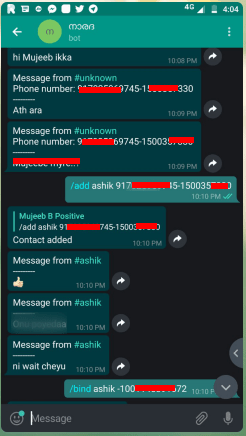
Binding groups
Bridge WhatsApp and Telegram groups using forked bot
- Add the WhatsApp number to required WhatsApp group and send /getID
- Now you will receive a message with random numbers starting with /link, copy that entire message
- Add Telegram bot in respective Telegram group
- Send the message received from WhatsApp group to Telegram group
- Now both the groups should be linked and you are all done!
Video Player00:0000:18
Cons of wat-bridge forked bot
- Receiving messages from Telegram to large WhatsApp groups having more than 200 people will crash the bot
- Latest pre contains media support which needs to be documented, for developers I suggest to checkout to previous commits for better results.
sumber : https://ibcomputing.com/category/telegram/ &
http://mcc-mnc.com/

 Tutorial For All